
Features
Schedule, auto-post and cross-post from one app
Bloom takes a post from idea to published. You write it once and pick a time, and Bloom publishes it to the accounts you connected. Here is everything it does today, and the few things it doesn’t do yet.
Free plan. No card needed. Works on the web, Android and iPhone.
Create: one composer for every platform
Every post starts in one place. Write your caption, add photos or a video, choose which accounts it goes to, and adjust the wording for any platform that needs it.
Write once, fit everywhere
Bloom fits your post to each platform’s rules: X’s character count and link handling, Bluesky’s 300-character limit with links kept whole, and Instagram’s 2,200-character captions.
Caption and hook templates
Fill-in templates for openers, captions and calls to action. You write in your own voice; Bloom doesn’t generate posts with AI.
An idea library you can search
Hundreds of post ideas, tagged so you can type what you want to make and get matching ideas. Business accounts get their own library of brand post ideas.
Hashtag sets and a media vault
Save up to 50 hashtag sets and keep your photos and videos in one vault: 500MB on the free plan, 10GB on Pro and Plus.
Schedule: a calendar that fills itself
Plan a day, a week or a month. The social media scheduler keeps every post on one calendar, whichever platform it’s going to.
Content calendar and drafts
See scheduled, drafted and published posts by month, and spot the days with nothing planned.
Bulk scheduling
Upload up to 60 photos or videos at once, choose how many posts a day and a start date, and Bloom spreads them out.
One-tap auto-schedule
Let Bloom pick the time. It uses sensible daily windows until your own results show better ones, and keeps posts at least 30 minutes apart.
Posting-rate warnings
Bloom warns you before you post too often, or plan the same image for several subreddits in a day.
Publish: automatic wherever the platform allows it
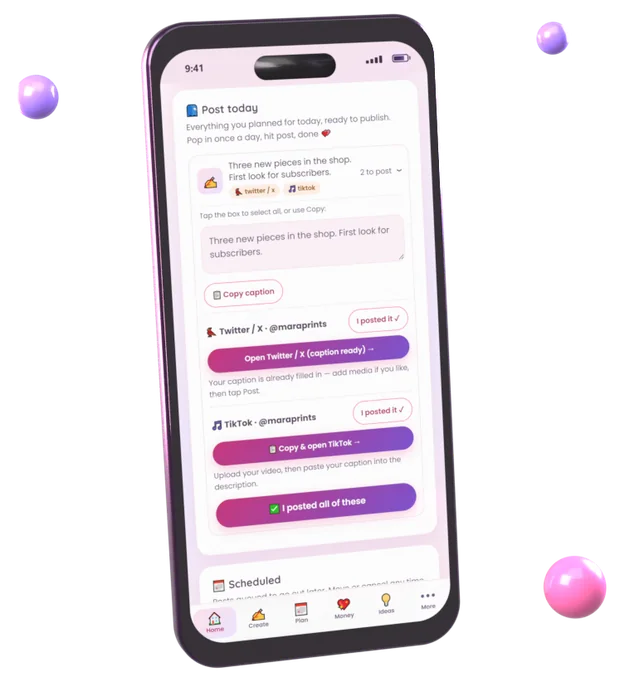
Bloom publishes through each platform’s official connection. Where a platform doesn’t allow automatic posting, Bloom prepares the post and reminds you, rather than failing quietly.
| Platform | How Bloom posts | What it can post | Not yet |
|---|---|---|---|
| Posts automatically | Single photos, carousels of up to 10 photos and videos, and a single video as a Reel, with captions up to 2,200 characters and alt text | Stories | |
| Facebook Pages | Posts automatically | Text posts, a single photo, up to 10 photos, or one video in a post | Personal profiles and groups, and a video with photos in the same post |
| Bluesky | Posts automatically | Posts up to 300 characters with up to 4 images or one video, with alt text | A video and photos in the same post |
| X (Twitter) | Automatic on Pro & Plus | Posts with up to 4 images or one video, with alt text | Threads of several posts |
| TikTok | Sent to your TikTok inbox | Videos up to 64MB, delivered to your TikTok inbox to finish and post | Direct publishing without the inbox step, and photo posts |
| Ready-to-post kit | A ready-to-post kit with your title and caption for each subreddit | Automatic posting | |
| Threads | Posts automatically | Posts up to 500 characters with up to 20 photos and videos, or a single video | Threads of several posts; a longer caption is shortened to fit |
| YouTube | Ready-to-post kit | A ready-to-post kit that opens YouTube’s upload page with your caption copied | Automatic uploads |
| Tumblr | Ready-to-post kit | A ready-to-post kit with your caption copied | Automatic posting |
| Not supported yet | Nothing yet | Not supported | |
| Not supported yet | Nothing yet | Not supported |
Read more about how auto-posting works and posting to several platforms at once. If a platform has a temporary problem, Bloom tries again up to three times. If a post still can’t go out, you get a notification.
Track: see what works and what it earns
Best times from your own results
Log how posts did, or what they earned, and Bloom works out your strongest days and hours instead of repeating generic advice.
Results
Bloom reads likes, comments, reach and views for the posts it publishes to Instagram and Facebook (reach and views on Instagram for accounts connected through Facebook), and likes, replies and reposts on Bluesky, a few times a day. Log anything else yourself, and see your best platform, content type and day.
Income and revenue
A ledger for what you earn, CSV import that skips duplicates, expenses, and a US quarterly tax estimate.
A link-in-bio page
One page for all your links, with click counts, so you can see which link people actually use.
A workspace built for businesses
Choose the Business workspace when you sign up and Bloom swaps creator tools for business ones: brand post ideas by industry, campaign and ad spend tracking with return on ad spend, and revenue and expenses. See Bloom for small businesses.
What Bloom doesn’t do
Knowing the limits up front saves you a wasted afternoon.
- No AI-written posts. Bloom helps with templates and ideas; the words are yours. This is a deliberate choice, not a gap.
- No bots and no password sharing. Accounts connect through each platform’s own sign-in, or a Bluesky app password you can revoke.
- No team seats yet. Each Bloom account is for one person.
- TikTok videos go to your TikTok inbox as a draft rather than publishing directly, and Instagram Stories aren’t supported.
- No LinkedIn or Pinterest.
Frequently asked questions
What is Bloom?
Bloom is a social media scheduling and auto-posting app for creators and small businesses. You write a post once and choose when it goes out. Bloom publishes it to Instagram, Facebook Pages, Threads and Bluesky automatically, posts to X on paid plans, sends videos to your TikTok inbox, and prepares ready-to-post kits for Reddit, YouTube and Tumblr.
Does Bloom use AI to write posts?
No. Bloom has no generative AI. It gives you fill-in templates, saved hashtag sets and a searchable idea library, and you write the post.
Which platforms does Bloom support?
Instagram, Facebook Pages, Threads and Bluesky (automatic posting), X (automatic on Pro and Plus), TikTok (videos sent to your inbox), and Reddit, YouTube and Tumblr (ready-to-post kits). See the full platform list.
Can I connect more than one account on the same platform?
Yes. You can connect several accounts per platform, give each one a label, and choose which accounts a post goes to.
Does Bloom work on my phone?
Yes. Bloom runs in any web browser and as an app for Android and iPhone, with the same account everywhere.
Write it once. Bloom posts it everywhere.
Connect your accounts, schedule your first post and let Bloom publish it. The free plan includes automatic posting to Instagram, Facebook, Threads and Bluesky.
Start free